
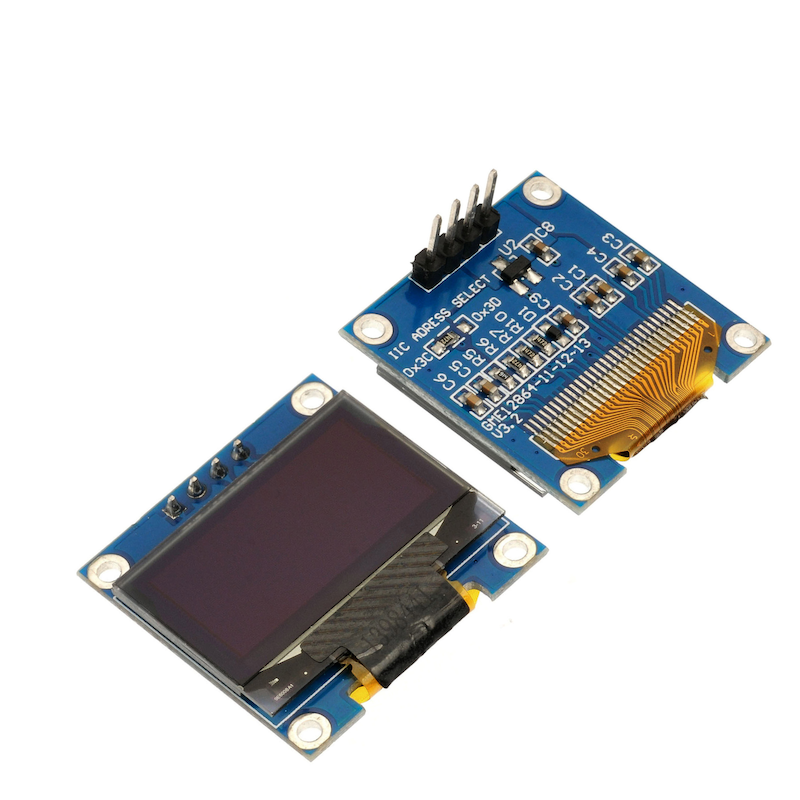
1. Introduction
2. Schematic
OLED display module - HS-F19-L schematicClick to view
Module Parameters
Pin Name | description |
|---|---|
GND | GND (Negative Power Input) |
VCC | VCC (Positive Power Input) |
SCL | Clock Signal Communication Pin |
SDA | Bidirectional Data Communication Pin |
Power Supply Voltage: 3.3V / 5V
Connection Type: 2.54mm Header
Installation method: Screw fixed
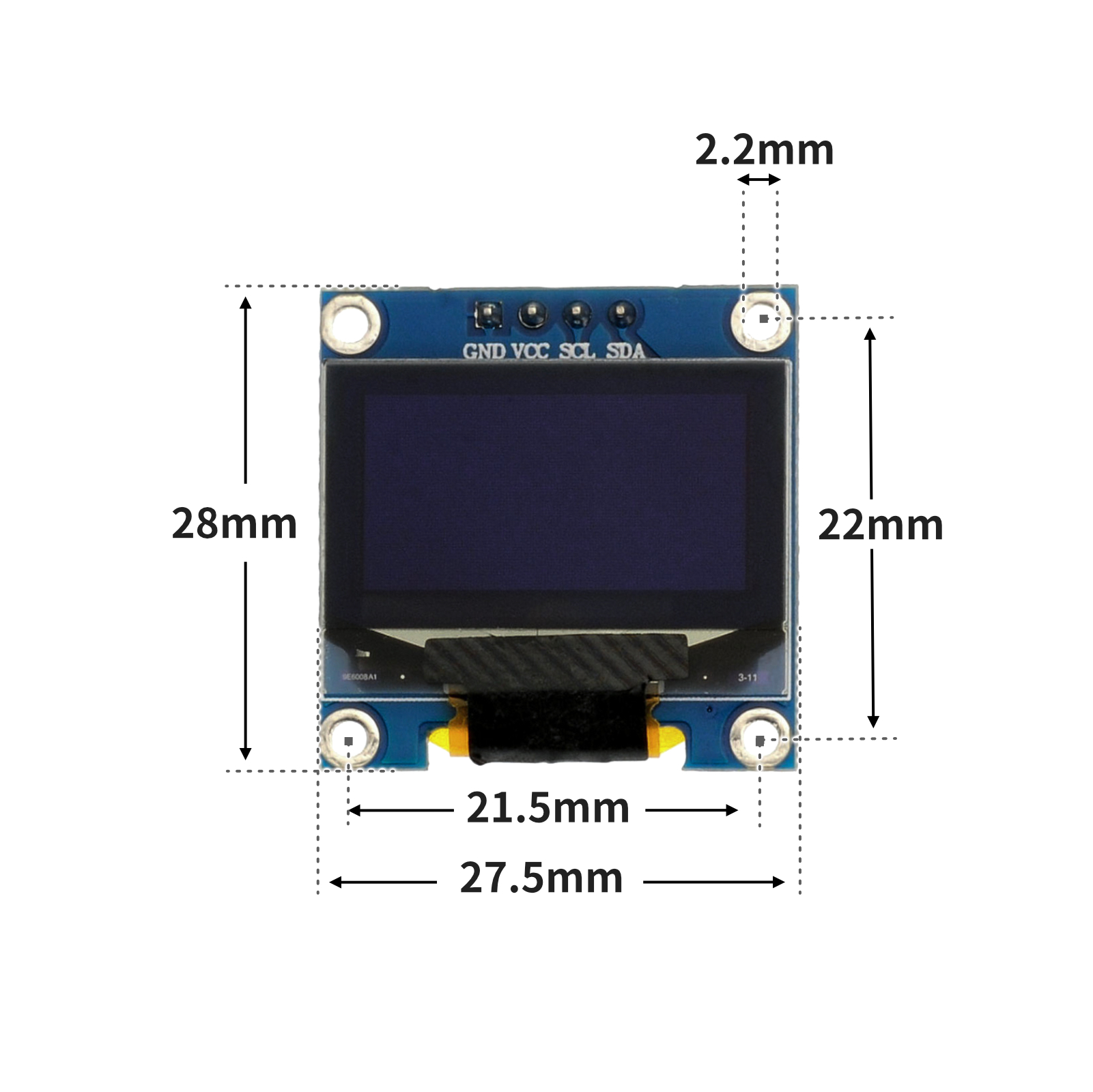
4, Circuit Board Size
5 of Arduino IDE example program
Attention: If prompted with an error message about the library file during program upload, please import the library file first!
Arduino IDE Library Download and Import Tutorial:Click to view
Example program (UNO development board):
#include <U8g2lib.h>
#include <Wire.h>
#include "CEJU.h"
#include "DW.h"

U8G2_SSD1306_128X64_NONAME_1_HW_I2C u8g2(U8G2_R0, U8X8_PIN_NONE);
//字体:华文黑体  字号:16px  显示文字:Hello
/*
------------------------------------------------------------------------------------------------
|  0 0 0         0 0 0 0                     0 0 0   0 0 0 0                                   |
|  0 0 0         0 0 0 0                     0 0 0   0 0 0 0                                   |
|  0 0 0         0 0 0 0                     0 0 0   0 0 0 0                                   |
|  0 0 0         0 0 0 0       0 0 0 0 0     0 0 0   0 0 0 0     0 0 0 0 0 0                   |
|  0 0 0         0 0 0 0     0 0 0   0 0 0   0 0 0   0 0 0 0   0 0 0     0 0 0                 |
|  0 0 0 0 0 0 0 0 0 0 0   0 0 0     0 0 0   0 0 0   0 0 0 0 0 0 0 0       0 0 0               |
|  0 0 0         0 0 0 0   0 0 0       0 0 0 0 0 0   0 0 0 0 0 0 0         0 0 0               |
|  0 0 0         0 0 0 0   0 0 0 0 0 0 0 0 0 0 0 0   0 0 0 0 0 0 0         0 0 0               |
|  0 0 0         0 0 0 0   0 0 0             0 0 0   0 0 0 0 0 0 0         0 0 0               |
|  0 0 0         0 0 0 0   0 0 0             0 0 0   0 0 0 0 0 0 0 0       0 0 0               |
|  0 0 0         0 0 0 0   0 0 0 0     0 0   0 0 0   0 0 0 0   0 0 0     0 0 0                 |
|  0 0 0         0 0 0 0     0 0 0 0 0 0     0 0 0   0 0 0 0     0 0 0 0 0 0                   |
|                                                                                              |
|                                                                                              |
|                                                                                              |
|                                                                                              |
------------------------------------------------------------------------------------------------
*/
//字体:华文黑体  字号:16px  显示文字:STEM
/*
------------------------------------------------------------------------------------------------
|    0 0 0 0 0 0   0 0 0 0 0 0 0 0 0 0 0 0 0 0 0 0 0 0   0 0 0 0             0 0 0 0           |
|  0 0 0     0 0 0       0 0 0         0 0 0             0 0 0 0             0 0 0 0           |
|0 0 0                   0 0 0         0 0 0             0 0 0 0 0           0 0 0 0           |
|0 0 0                   0 0 0         0 0 0             0 0 0 0 0         0 0 0 0 0           |
|0 0 0 0                 0 0 0         0 0 0             0 0 0 0 0 0       0 0 0 0 0           |
|  0 0 0 0 0             0 0 0         0 0 0 0 0 0 0 0   0 0 0 0 0 0     0 0 0 0 0 0           |
|      0 0 0 0 0         0 0 0         0 0 0             0 0 0   0 0 0   0 0 0 0 0 0           |
|          0 0 0 0       0 0 0         0 0 0             0 0 0   0 0 0 0 0 0   0 0 0           |
|            0 0 0       0 0 0         0 0 0             0 0 0     0 0 0 0 0   0 0 0           |
|            0 0 0       0 0 0         0 0 0             0 0 0     0 0 0 0     0 0 0           |
|0 0 0       0 0 0       0 0 0         0 0 0             0 0 0     0 0 0 0     0 0 0           |
|  0 0 0 0 0 0           0 0 0         0 0 0 0 0 0 0 0   0 0 0       0 0 0     0 0 0           |
|                                                                                              |
|                                                                                              |
|                                                                                              |
|                                                                                              |
------------------------------------------------------------------------------------------------
*/

void page1() {
  u8g2.setFont(u8g2_font_timR18_tf);
  u8g2.setFontPosTop();
  u8g2.drawXBMP(20, 30, 48, 16, CEJU);
  u8g2.drawXBMP(60, 30, 48, 16, DW);
}

void setup(){
  u8g2.setI2CAddress(0x3C*2);
  u8g2.begin();
}

void loop(){
  u8g2.firstPage();
  do
  {
    page1();
  }while(u8g2.nextPage());

}
6, ESP32 Python Example (for Mixly IDE/Misashi)
Choose the development board Python ESP32 [ESP32 Generic(4MB)] and upload in code mode
Attention: If prompted with an error message about the library file during program upload, please import the library file first!
Download and import tutorial for Mixly IDE ESP32 library:Click to view
Example program (ESP32-Python):
import machine
import oled128x64


i2c_extend = machine.SoftI2C(scl = machine.Pin(22), sda = machine.Pin(21), freq = 100000)
oled = oled128x64.OLED(i2c_extend,address=0x3c,font_address=0x3A0000)
oled.shows('HelloSTEM')
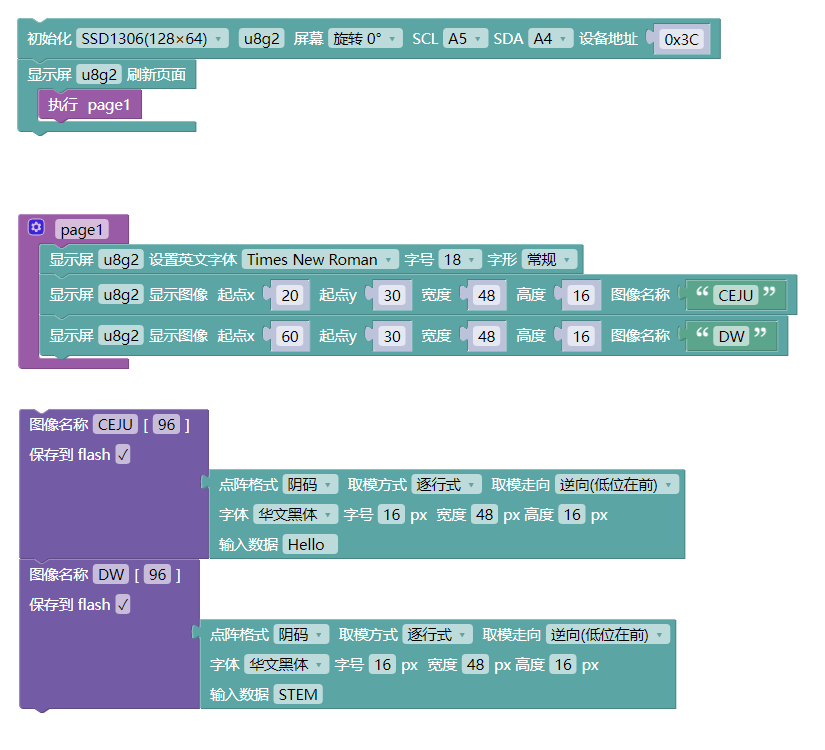
7, Mixly example program (graphical language)
Example program (UNO development board):Click to download
Attention: If prompted with an error message about the library file during program upload, please import the library file first!
Download and import tutorial of Mixly IDE Arduino library:Click to view
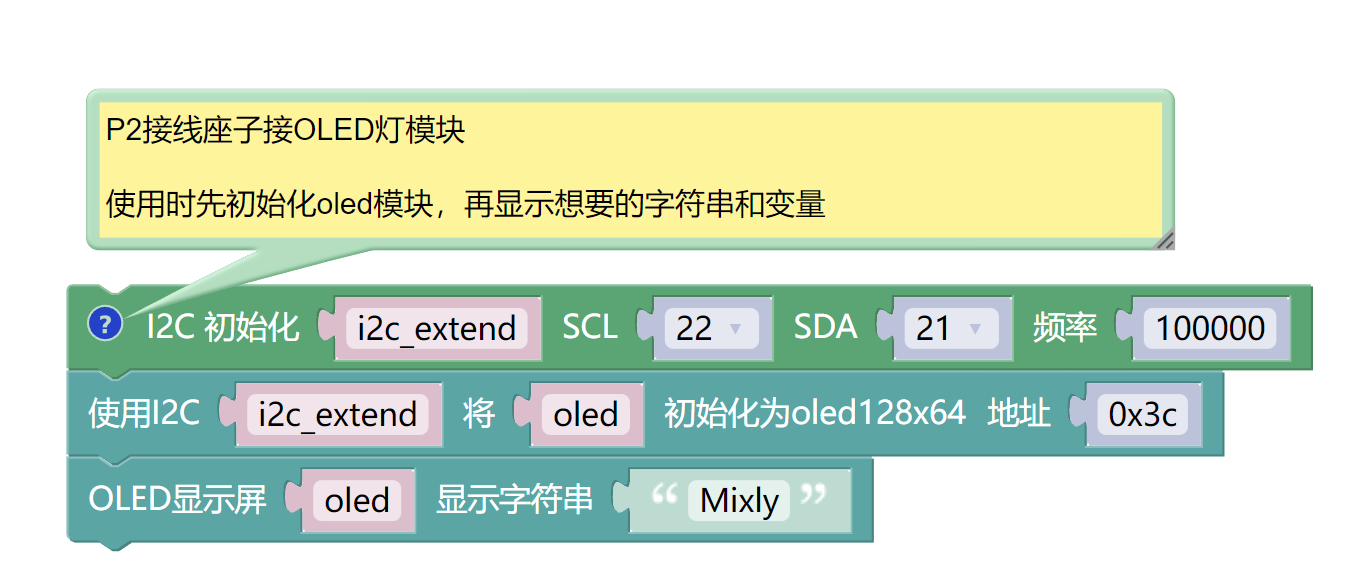
Example Program (ESP32 Development Board):Click to download
Attention: If prompted with an error message about the library file during program upload, please import the library file first!
Download and import tutorial for Mixly IDE ESP32 library:Click to view
8. Setting up the Test Environment
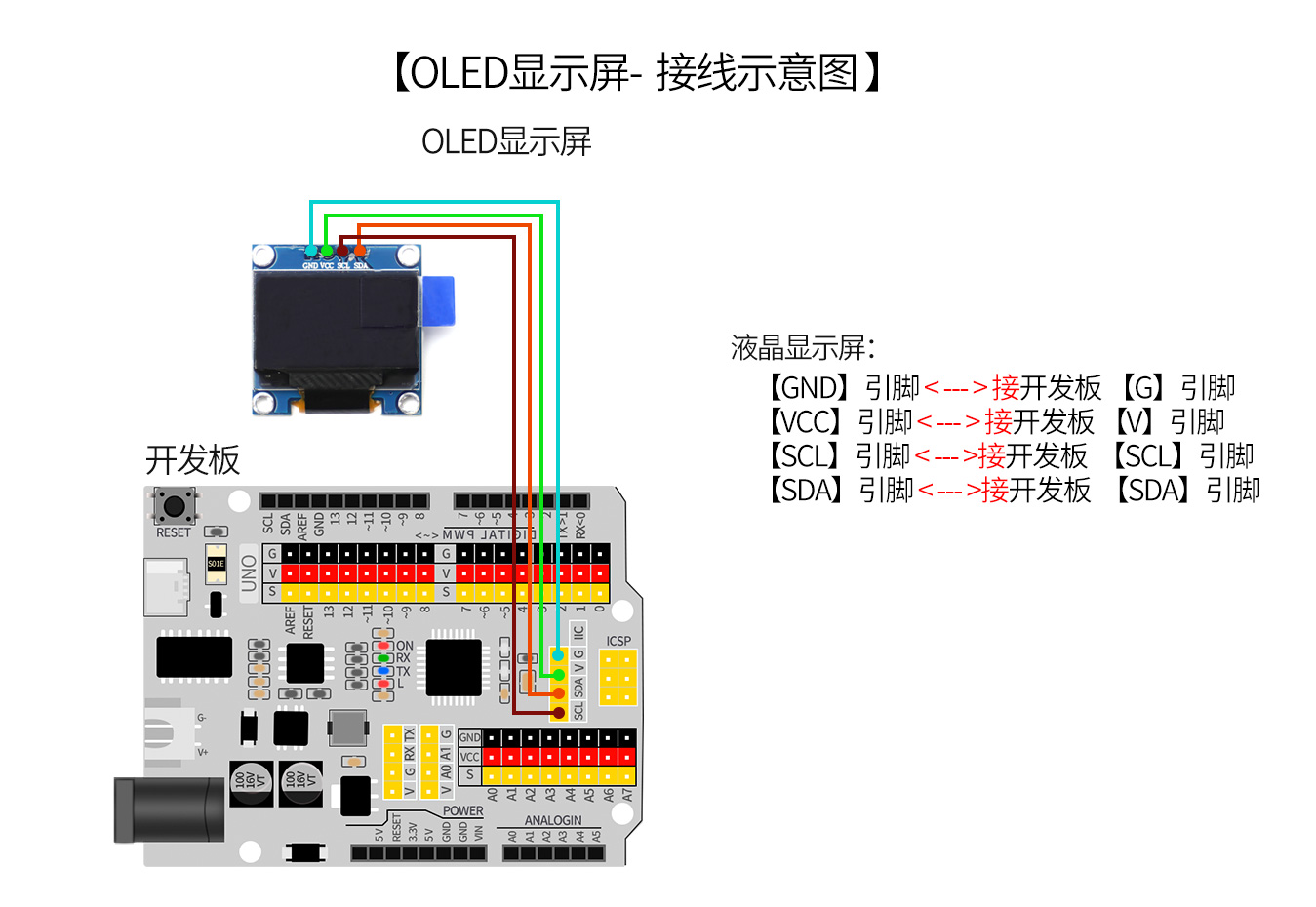
Arduino UNO Test Environment Setup
Prepare Components:
HELLO STEM UNO R3 PRO DEVELOPMENT BOARD *1
USB TYPE-C DATA CABLE *1
OLED display*1
1P female to female Dupont wire *4 pieces or 2P female to female Dupont wire *2 pieces
Circuit wiring diagram:
ESP32 Test Environment Setup
Prepare Components:Pending update...
Circuit wiring diagram:Pending update...
9, Video tutorial
Video tutorial:Click to view
10, Test results
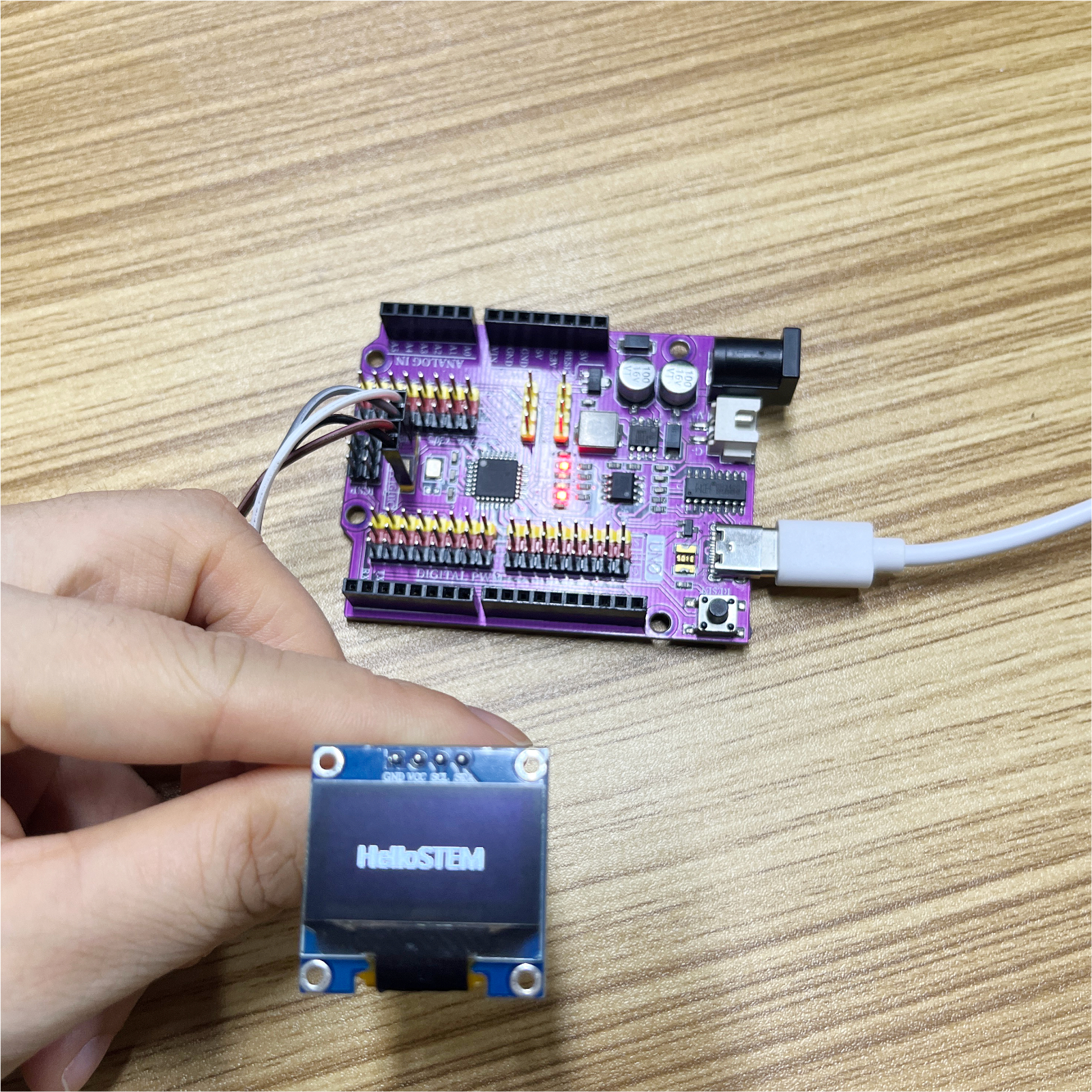
Arduino UNO test results:
Display the text and images set in our program on the OLED screen.
ESP32 Test Results:
Pending update...