
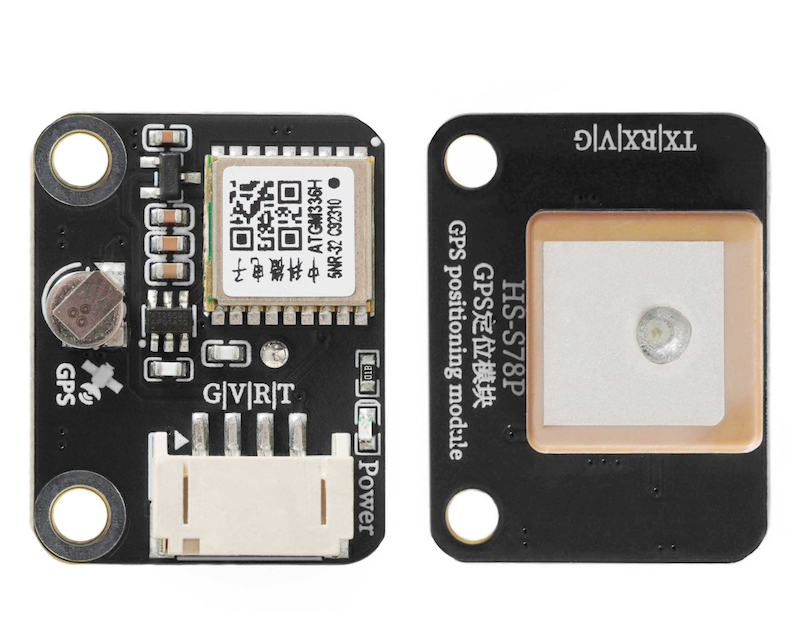
1. Introduction
The ATGM336H-5N series is a small-size, high-performance BDS/GNSS full constellation positioning navigation module based on the fourth-generation low-power GNSS SOC single-chip AT6558 from Zhongkewei, supporting multiple satellite navigation systems and satellite augmentation systems, with 32 tracking channels, capable of simultaneously receiving GNSS signals from six systems and joint positioning navigation timing, with high sensitivity, low power consumption, and low cost advantages, suitable for vehicle navigation, handheld positioning, wearable devices, and can directly replace the Ublox MAX series modules.
2. Schematic
GPS module-HS-S78P schematicClick to view
Module Parameters
Pin Name | description |
|---|---|
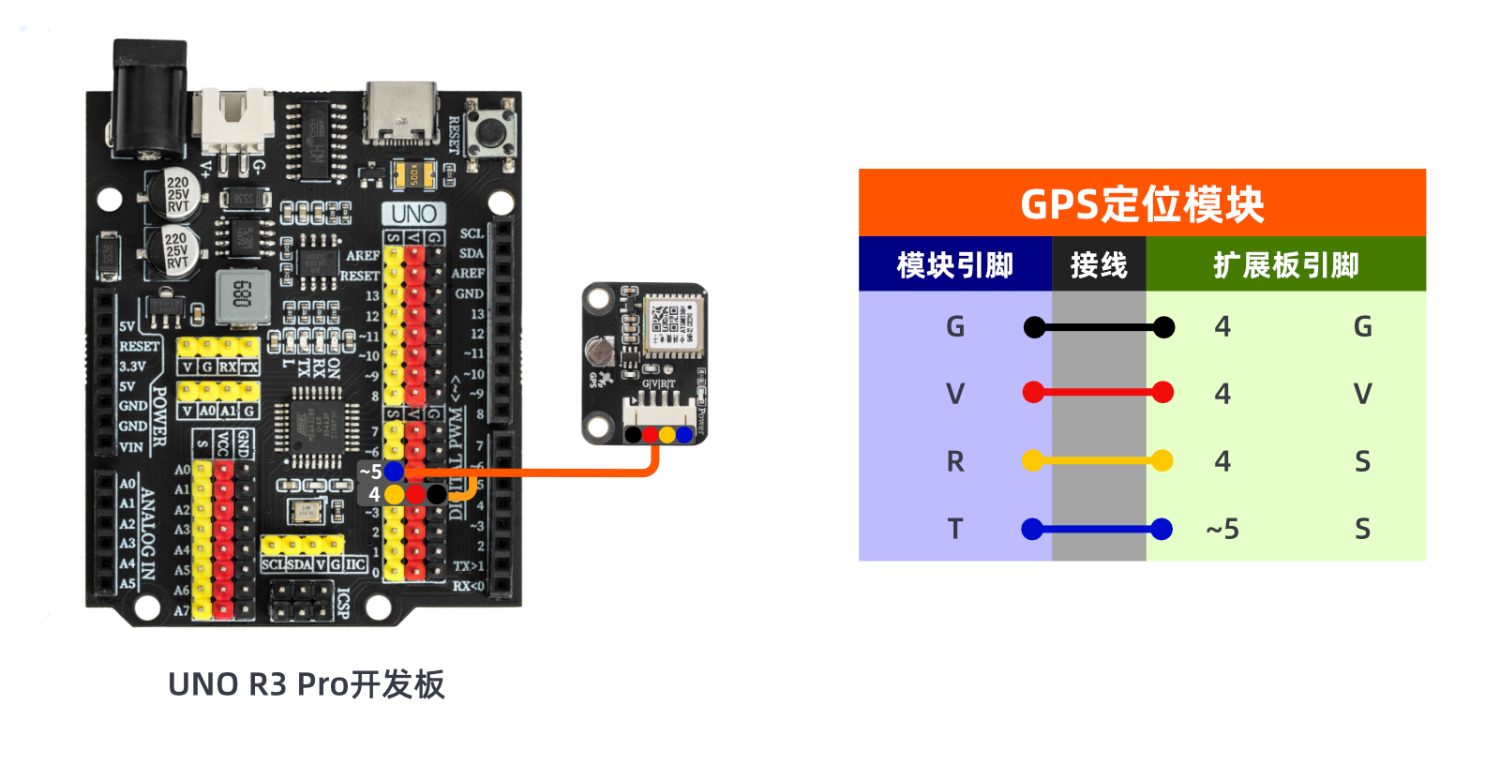
G | GND (Negative Power Input) |
V | VCC (Positive Power Input) |
R | RX pin for serial communication transmission |
T | TX pin for serial communication transmission |
Supply voltage: 3.3V-5V
Connection method: PH2.0 4P terminal wire
Installation method: Screw fixed
4, Circuit Board Size
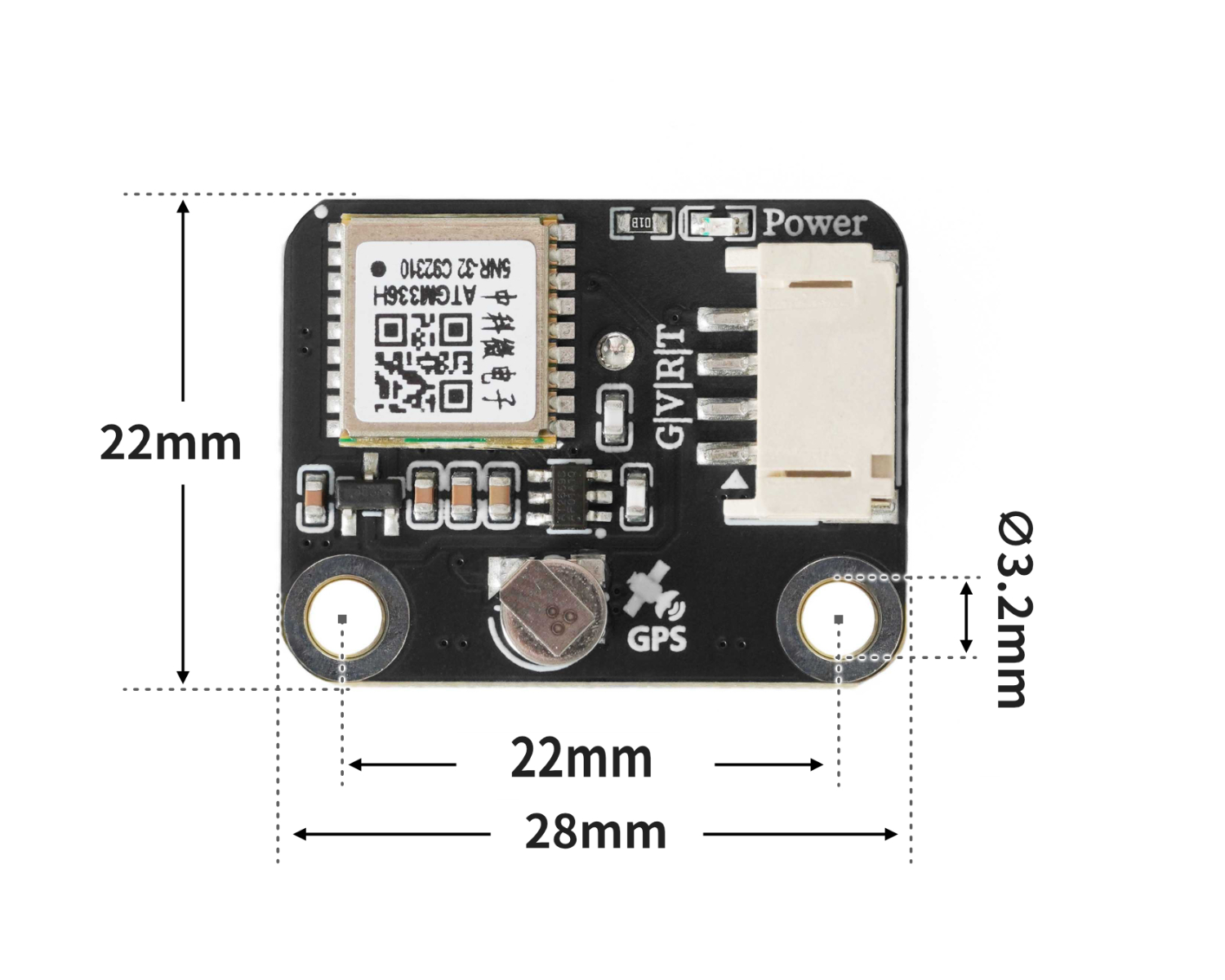
5 of Arduino IDE example program
Attention: If prompted with an error message about the library file during program upload, please import the library file first!
Arduino IDE Library Download and Import Tutorial:Click to view
Example program (UNO development board):
#include <TinyGPS++.h>
#include <SoftwareSerial.h>

TinyGPSPlus gps;
SoftwareSerial gps_ss(A5, A4);

void setup(){
  gps_ss.begin(9600);
  Serial.begin(9600);
}

void loop(){
  while (gps_ss.available()) {
    if (gps.encode(gps_ss.read())) {
      if (gps.location.isValid()) {
        Serial.println(gps.location.lat());
        Serial.println(gps.location.lng());

      }

    }
  }

}
6, ESP32 Python Example (for Mixly IDE/Misashi)
Choose the development board Python ESP32 [ESP32 Generic(4MB)] and upload in code mode
Attention: If prompted with an error message about the library file during program upload, please import the library file first!
Download and import tutorial for Mixly IDE ESP32 library:Click to view
Example program (ESP32-Python):
from machine import UART, Pin
import time
import machine


# 示例程序

class GPSNMEA:
    def __init__(self):
        self._buf = bytearray()
        self._lat = None
        self._lon = None
        self._fix_ok = False
        self._sats = 0
        self._fix_quality = 0
        self._hdop = None
        self._rmc_valid = False
        self._utc_time = None
        self._date = None
    def has_fix(self):
        return bool(self._fix_ok)
    def latitude(self):
        return self._lat
    def longitude(self):
        return self._lon
    def satellites(self):
        return self._sats
    def hdop(self):
        return self._hdop
    def beijing_time(self):
        dt = self.beijing_datetime_tuple()
        if dt:
            y, mo, d, hh, mm, ss = dt
            return f"{y:04d}-{mo:02d}-{d:02d} {hh:02d}:{mm:02d}:{ss:02d}"
        return None
    def beijing_datetime_tuple(self):
        if not self._utc_time or not self._date:
            return None
        day, month, year_2 = self._date
        year_full = 2000 + year_2 if year_2 < 80 else 1900 + year_2
        h, m, s = self._utc_time
        try:
            epoch = time.mktime((year_full, month, day, h, m, s, 0, 0))
            epoch += 8 * 3600
            y, mo, d, hh, mm, ss, _, _ = time.localtime(epoch)
            return (y, mo, d, hh, mm, ss)
        except:
            return None
    def feed(self, data):
        if data is None:
            return
        if isinstance(data, int):
            data = bytes([data])
        elif isinstance(data, memoryview):
            data = bytes(data)
        elif isinstance(data, str):
            data = data.encode('ascii', 'ignore')
        self._buf.extend(data)
        while True:
            idx = self._buf.find(b'\n')
            if idx < 0:
                break
            line = self._buf[:idx + 1]
            self._buf = self._buf[idx + 1:]
            try:
                s = bytes(line).decode('ascii', 'ignore').strip()
            except:
                continue
            if s:
                self._handle_sentence(s)
    def _handle_sentence(self, s):
        if not s.startswith('$') or len(s) < 7:
            return
        if not self._checksum_ok(s):
            return
        fields = s.split('*', 1)[0].split(',')
        tag = fields[0][1:]
        if tag.endswith('RMC'):
            self._parse_rmc(fields)
        elif tag.endswith('GGA'):
            self._parse_gga(fields)
        self._fix_ok = self._rmc_valid or (self._fix_quality > 0)
    @staticmethod
    def _checksum_ok(sentence):
        if not sentence.startswith('$') or '*' not in sentence:
            return False
        try:
            data, cshex = sentence[1:].split('*', 1)
        except ValueError:
            return False
        calc = 0
        for ch in data:
            calc ^= ord(ch)
        try:
            given = int(cshex.strip()[:2], 16)
        except ValueError:
            return False
        return calc == given
    @staticmethod
    def _dm_to_deg(dm, neg):
        if not dm or '.' not in dm:
            return None
        i = dm.find('.')
        head, tail = dm[:i], dm[i:]
        if len(head) < 3:
            return None
        try:
            minutes = float(head[-2:] + tail)
            degrees = float(head[:-2]) if head[:-2] else 0.0
        except ValueError:
            return None
        dec = degrees + minutes / 60.0
        return -dec if neg else dec
    def _parse_rmc(self, f):
        if len(f) < 7:
            self._rmc_valid = False
            return
        if len(f) > 1 and f[1]:
            try:
                hh = int(f[1][0:2]); mm = int(f[1][2:4]); ss = int(f[1][4:6])
                self._utc_time = (hh, mm, ss)
            except:
                pass
        if len(f) > 9 and f[9]:
            try:
                dd = int(f[9][0:2]); mo = int(f[9][2:4]); yy = int(f[9][4:6])
                self._date = (dd, mo, yy)
            except:
                pass
        status = f[2] if len(f) > 2 else 'V'
        self._rmc_valid = (status == 'A')
        if not self._rmc_valid:
            return
        lat = self._dm_to_deg(f[3] if len(f) > 3 else ', (f[4] if len(f) > 4 else ') == 'S')
        lon = self._dm_to_deg(f[5] if len(f) > 5 else ', (f[6] if len(f) > 6 else ') == 'W')
        if (lat is not None) and (lon is not None):
            self._lat, self._lon = lat, lon
    def _parse_gga(self, f):
        if len(f) < 10:
            return
        try:
            self._fix_quality = int(f[6]) if f[6] else 0
        except ValueError:
            self._fix_quality = 0
        try:
            self._sats = int(f[7]) if f[7] else 0
        except ValueError:
            self._sats = 0
        try:
            self._hdop = float(f[8]) if f[8] else None
        except ValueError:
            self._hdop = None
        if self._fix_quality > 0:
            lat = self._dm_to_deg(f[2], f[3] == 'S') if len(f) > 4 else None
            lon = self._dm_to_deg(f[4], f[5] == 'W') if len(f) > 6 else None
            if (lat is not None) and (lon is not None):
                self._lat, self._lon = lat, lon

uart = UART(1, baudrate=9600, tx=Pin(17), rx=Pin(16), timeout=1000)
gps = GPSNMEA()

def get_latitude():
    return gps.latitude()
def get_longitude():
    return gps.longitude()
def get_beijing_time():
    return gps.beijing_time()
def get_beijing_datetime_tuple():
    return gps.beijing_datetime_tuple()
def has_fix():
    return gps.has_fix()

buf = bytearray(256)
# 这个变量必须有,获取时间块使用的这个变量
dt = (0,0,0,0,0,0)
while True:

    # -----------------------串口数据切片处理------------------------------------

    n = uart.any()  # 检查 UART 缓冲区中是否有可读取的字节数量
    if n:
        # 防止读取的数据超过缓冲区长度
        n = min(n, len(buf))
        # 从 UART 中读取 n 个字节到 buf 数组中
        read_bytes = uart.readinto(buf, n)
        if read_bytes:
            # 将实际读取的字节切片,并转换成 bytes 类型,传给 GPS 解析器
            gps.feed(bytes(buf[:read_bytes]))

    #-------------------------------------------------------------------------
    if has_fix():
        WeiDu = get_latitude()
        JingDu = get_longitude()
        dt = get_beijing_datetime_tuple()
        print(('纬度:' + str(WeiDu)))
        print(('经度:' + str(JingDu)))
        time.sleep(1)
        # 需先让GPS获取时间
        if dt:
            print('时间:',end ="")
            print((str(dt[3]) + ' : '),end ="")
            print((str(dt[4]) + ' : '),end ="")
            print(str(dt[5]))
    else:
        print('解析失败')
7, Mixly example program (graphical language)
Example program (UNO development board):Click to download
Attention: If prompted with an error message about the library file during program upload, please import the library file first!
Download and import tutorial of Mixly IDE Arduino library:Click to view
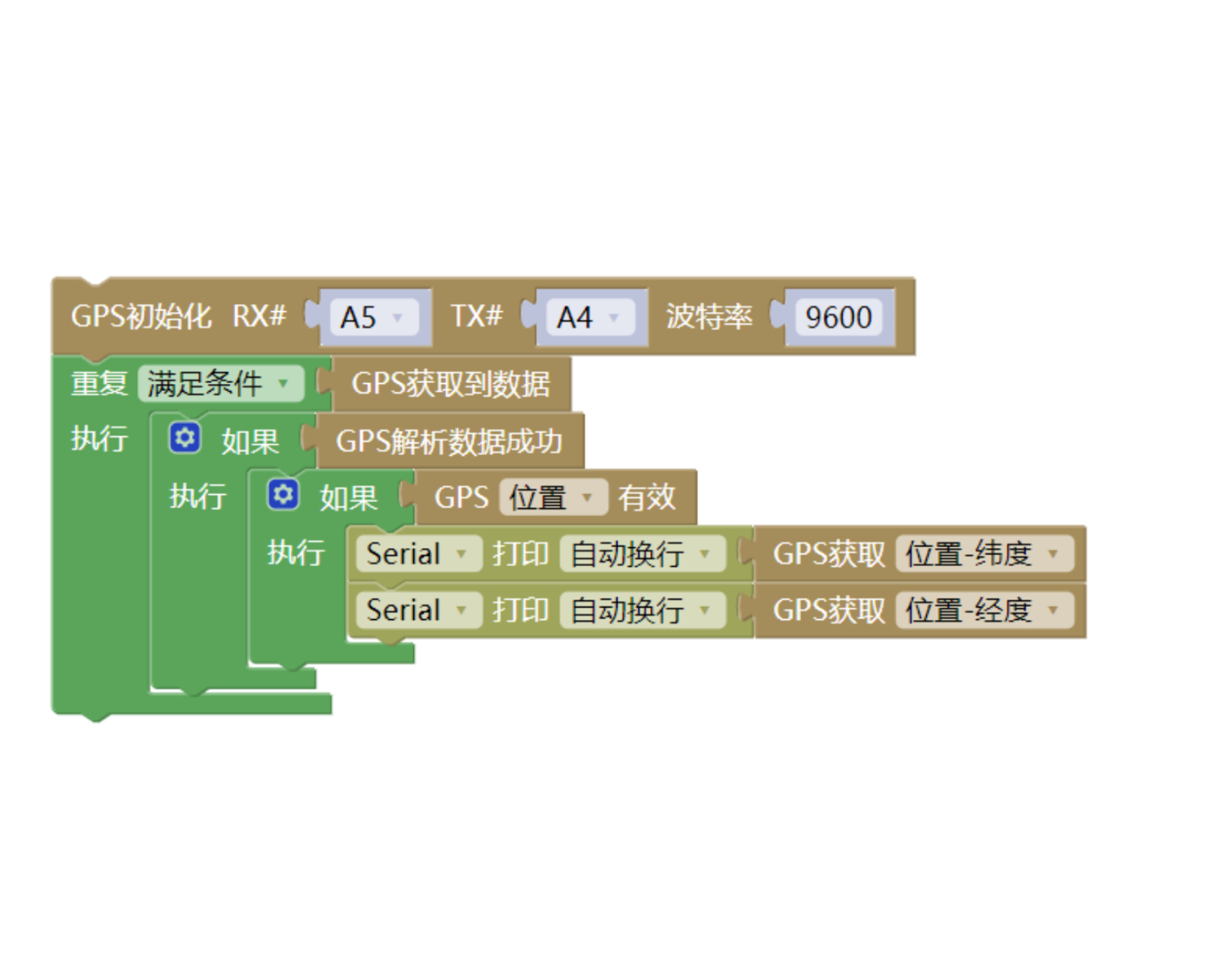
Example Program (ESP32 Development Board):Click to download
Attention: If prompted with an error message about the library file during program upload, please import the library file first!
Download and import tutorial for Mixly IDE ESP32 library:Click to view
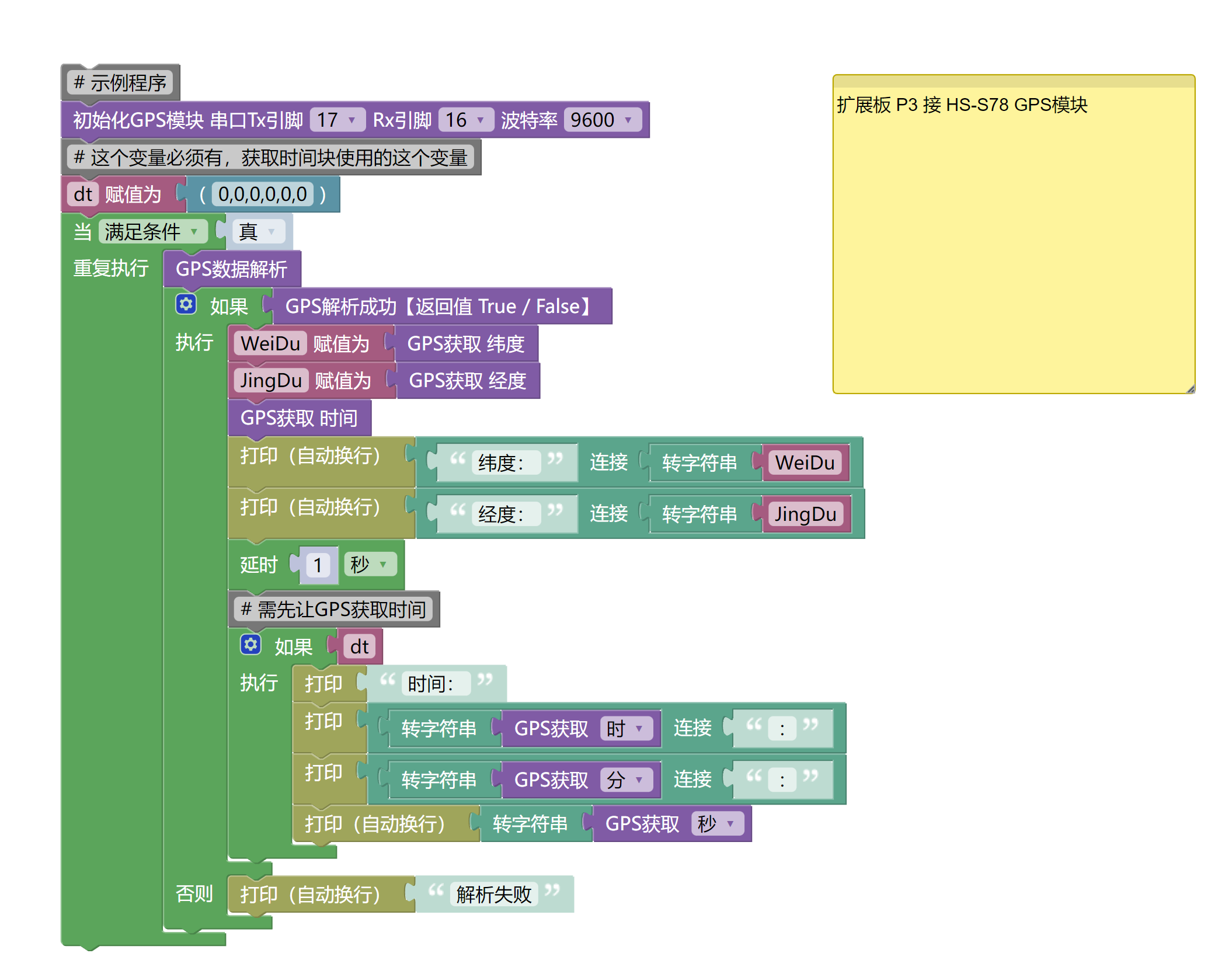
8. Setting up the Test Environment
Arduino UNO Test Environment Setup
Prepare Components:
UNO-R3 Development Board *1
UNO-R3 Expansion Board *1
USB TYPE-C DATA CABLE *1
HS-S78P GPS module*1
PH2.0 4P Double Head Terminal Line *1
Circuit wiring diagram:
ESP32 Test Environment Setup
Prepare Components:Pending update...
Circuit wiring diagram:Pending update...
9, Video tutorial
Arduino UNO video tutorial:Click to view
ESP32 Python Video Tutorial:Click to view
10, Test results
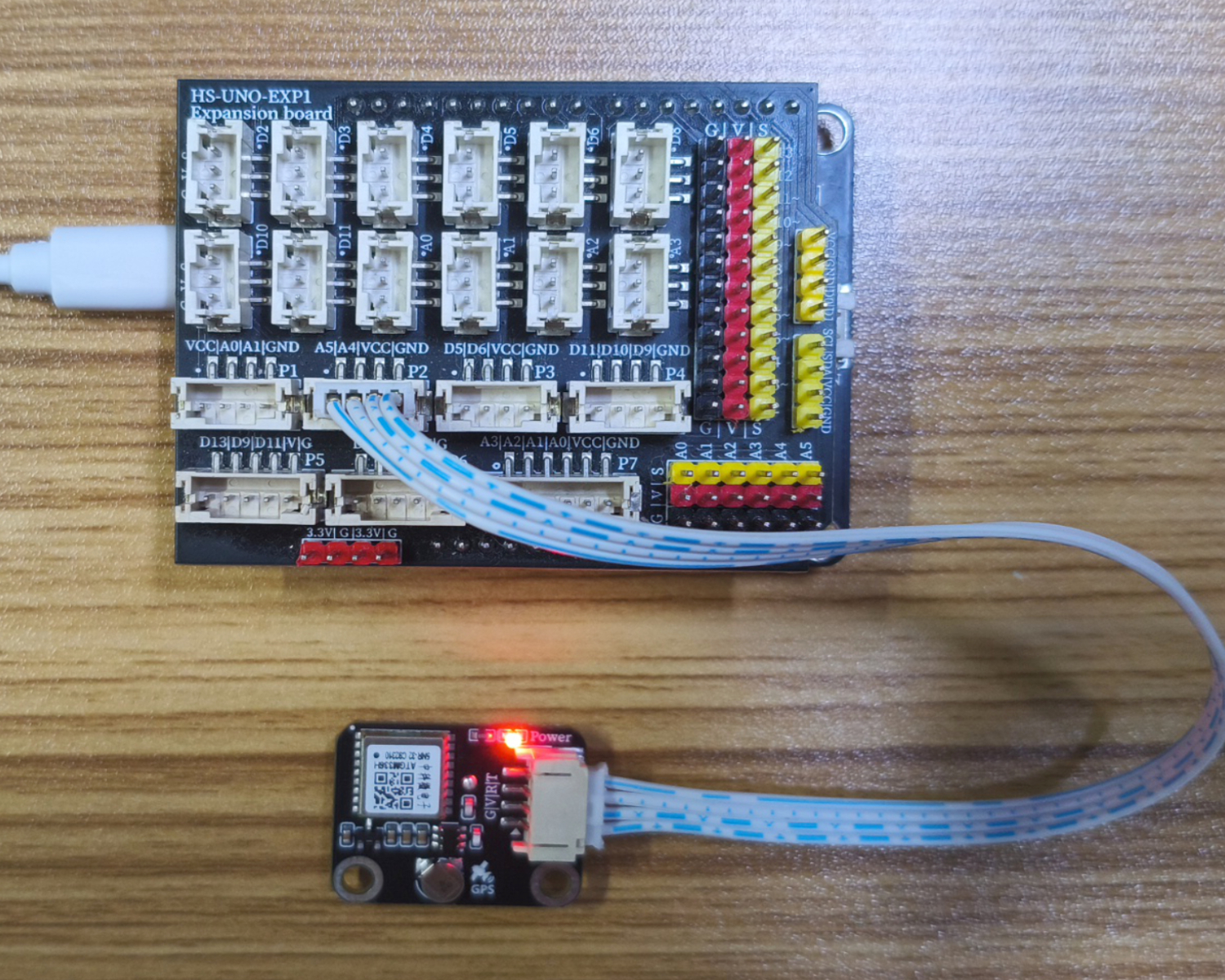
Arduino UNO test results:
Enter the code, and you can see your longitude and latitude on the computer serial port.Note: Due to antenna signal reasons, it may not be possible to print and display the longitude and latitude indoors. It is best to test in an open area outdoors.
ESP32 Test Results:
Pending update...