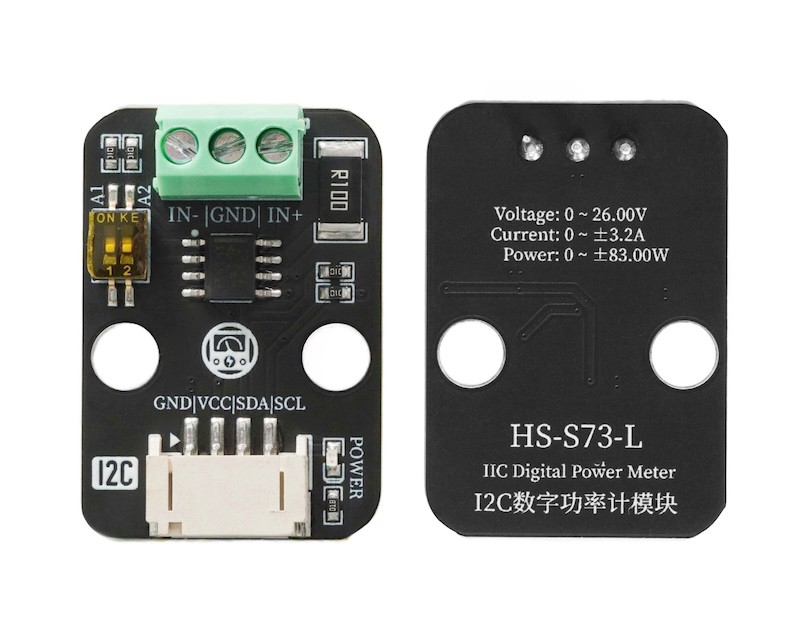
1、소개
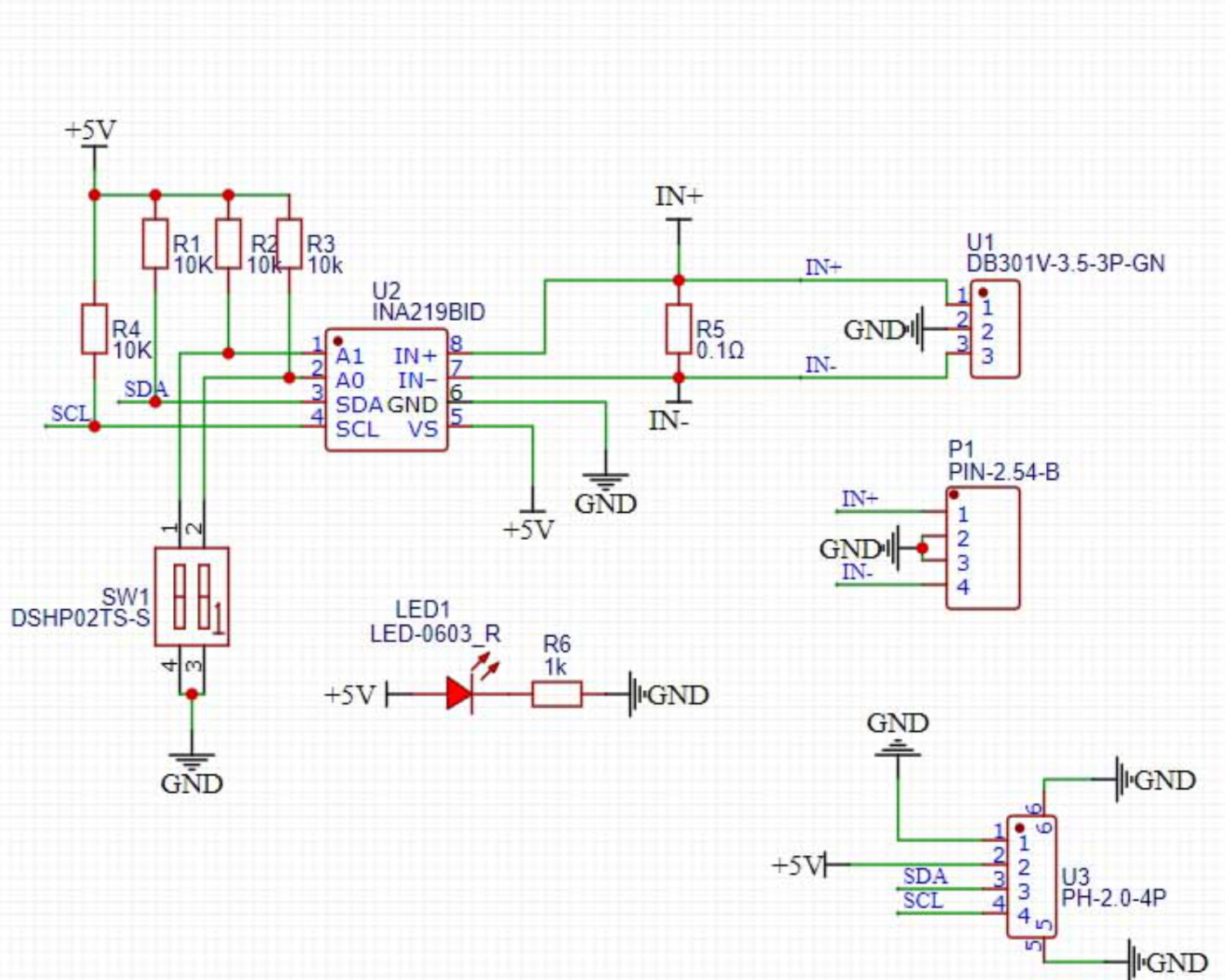
2、시뮬레이션 그래프
3、모듈 매개변수
핀 이름 | 설명 |
|---|---|
G | GND(전원 입력 부정极) |
V | VCC(전원 입력 정극) |
SDA | 데이터핀 |
SCL | 시계핀 |
전원 공급 전압: 3.3V-5V
연결 방식: PH2.0 4P 핀 라인
설치 방법: 블록 고정
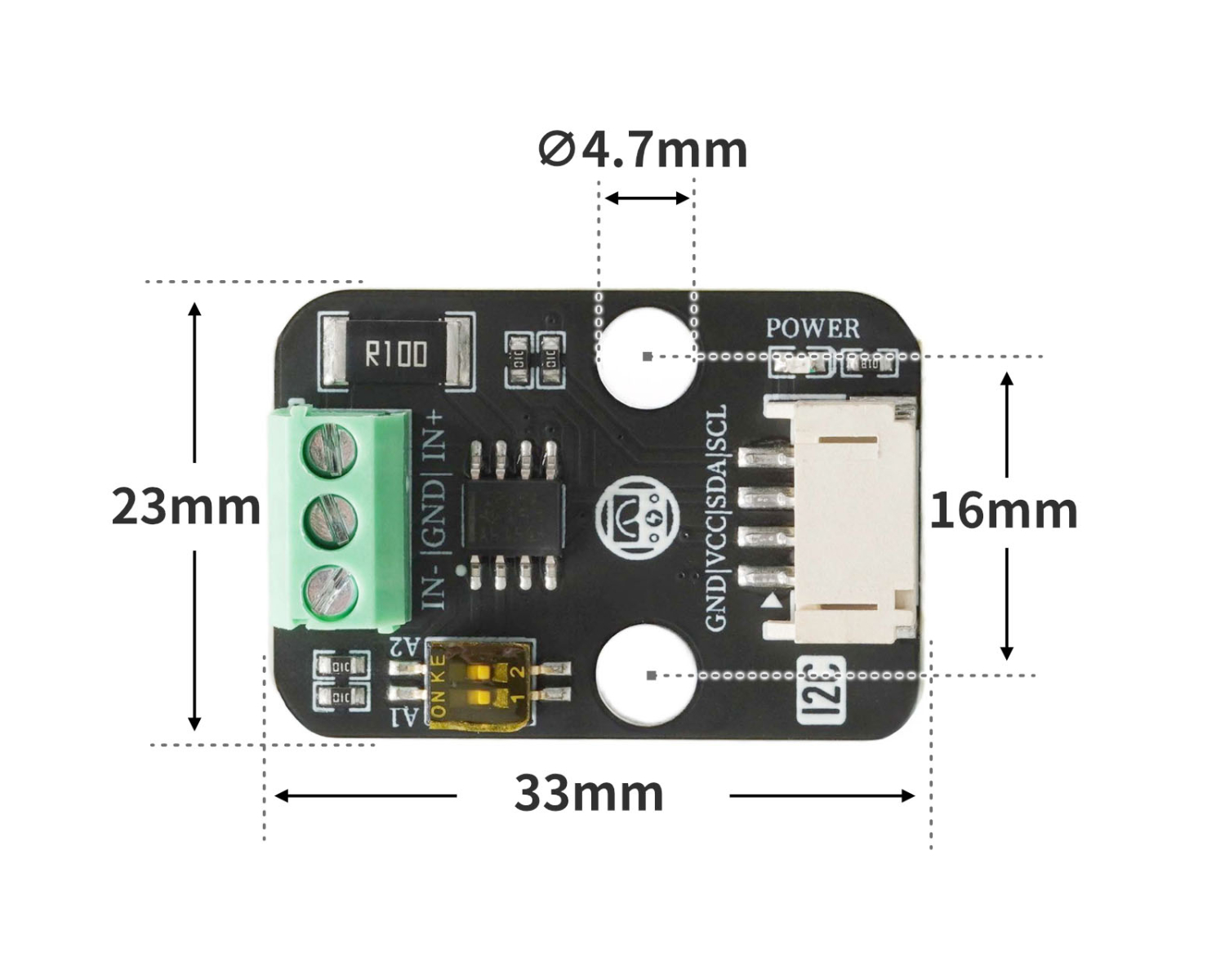
4、회로판 크기
5、Arduino 라이브러리 추가
라이브러리를 사용하지 못하는 참고 여기:라이브러리 설치 사용 방법
라이브러리 다운로드: 다운로드 클릭
미스키 UNO 개발판 라이브러리 설치 단계(코드 사용 전 미스키 라이브러리를 다운로드하고 설치하세요):참고 링크
6、한국어로 MicroPython 환경 라이브러리 파일 추가
미스키 ESP32 개발 보드 라이브러리 파일 다운로드 및 설치 단계(코드 사용 전 먼저 미스키 라이브러리 파일을 다운로드 및 설치하세요):참고 링크
7、아두이노 IDE 예제 프로그램
예제 프로그램(UNO 개발보드):다운로드 클릭
#include "DFRobot_INA219.h"
#include <Wire.h>

DFRobot_INA219_IIC     ina219(&Wire, INA219_I2C_ADDRESS4);

float ina219Reading_mA = 1000;
float extMeterReading_mA = 1000;

void setup(){

  while (!ina219.begin()) {
    Serial.println("INA219 初始化失败:请检查I2C接线/地址是否正确");
    delay(1000);
  }

  ina219.linearCalibrate(ina219Reading_mA, extMeterReading_mA);
  Serial.begin(9600);
}

void loop(){
  Serial.println(String("总线电压:") + String(ina219.getBusVoltage_V()));
  Serial.println(String("分流电压:") + String(ina219.getShuntVoltage_mV()));
  Serial.println(String("电流值:") + String(ina219.getCurrent_mA()));
  Serial.println(String("功率值") + String(ina219.getPower_mW()));
  Serial.println(String("------------------"));
  delay(500);

}
ESP32 Python 예제(Mixly IDE / 미스키에 적용됨)
(개발 보드를 선택한 Python ESP32 【ESP32 Generic(4MB)】를 코드 모드로 전환하여 업로드 ):
from machine import I2C, Pin
import time

INA219_REG_CONFIG        = 0x00
INA219_REG_SHUNTVOLTAGE  = 0x01
INA219_REG_BUSVOLTAGE    = 0x02
INA219_REG_POWER         = 0x03
INA219_REG_CURRENT       = 0x04
INA219_REG_CALIBRATION   = 0x05

INA219_CONFIG_RESET      = 0x8000
INA219_I2C_ADDRESS1      = 0x40
INA219_I2C_ADDRESS2      = 0x41
INA219_I2C_ADDRESS3      = 0x44
INA219_I2C_ADDRESS4      = 0x45

class eIna219BusVolRange_t:
    eIna219BusVolRange_16V = 0x0000
    eIna219BusVolRange_32V = 0x2000

class eIna219PGABits_t:
    eIna219PGABits_1 = 0x0000
    eIna219PGABits_2 = 0x0800
    eIna219PGABits_4 = 0x1000
    eIna219PGABits_8 = 0x1800

class eIna219AdcBits_t:
    eIna219AdcBits_9  = 0
    eIna219AdcBits_10 = 1
    eIna219AdcBits_11 = 2
    eIna219AdcBits_12 = 3

class eIna219AdcSample_t:
    eIna219AdcSample_1   = 0x00
    eIna219AdcSample_2   = 0x01
    eIna219AdcSample_4   = 0x02
    eIna219AdcSample_8   = 0x03
    eIna219AdcSample_16  = 0x04
    eIna219AdcSample_32  = 0x05
    eIna219AdcSample_64  = 0x06
    eIna219AdcSample_128 = 0x07

class eInaMode_t:
    eIna219PowerDown    = 0x00
    eIna219SVolTrig     = 0x01
    eIna219BVolTrig     = 0x02
    eIna219SAndBVolTrig = 0x03
    eIna219AdcOff       = 0x04
    eIna219SVolCon      = 0x05
    eIna219BVolCon      = 0x06
    eIna219SAndBVolCon  = 0x07

class HELLO_STEM_INA219:
    def __init__(self, i2c_bus, i2c_addr=INA219_I2C_ADDRESS1):
        self._i2c = i2c_bus
        self._addr = i2c_addr
        self.calValue = 0x0000
        self.lastOperateStatus = 'eIna219_InitError'

    def _writeReg(self, reg, data):
        try:
            buffer = bytearray([reg, (data >> 8) & 0xFF, data & 0xFF])
            self._i2c.writeto(self._addr, buffer)
            self.lastOperateStatus = 'eIna219_ok'
        except Exception:
            self.lastOperateStatus = 'eIna219_WriteRegError'

    def _readReg(self, reg):
        try:
            self._i2c.writeto(self._addr, bytearray([reg]))
            buffer = self._i2c.readfrom(self._addr, 2)
            self.lastOperateStatus = 'eIna219_ok'
            return (buffer[0] << 8) | buffer[1]
        except Exception:
            self.lastOperateStatus = 'eIna219_ReadRegError'
            return 0

    def _readInaReg(self, reg):
        value = self._readReg(reg)
        if value & 0x8000:
            return value - 0x10000
        return value

    def _readInaRegUnsigned(self, reg):
        return self._readReg(reg)

    def _writeInaReg(self, reg, value):
        self._writeReg(reg, value)

    def scan(self):
        try:
            self._i2c.writeto(self._addr, bytearray([]))
            return True
        except OSError as e:
            if str(e) == '[Errno 5] EIO':
                 return False
            return False

    def begin(self):
        self.lastOperateStatus = 'eIna219_InitError'
        if self.scan():
            self.setBRNG(eIna219BusVolRange_t.eIna219BusVolRange_32V)
            self.setPGA(eIna219PGABits_t.eIna219PGABits_8)
            self.setBADC(eIna219AdcBits_t.eIna219AdcBits_12, eIna219AdcSample_t.eIna219AdcSample_8)
            self.setSADC(eIna219AdcBits_t.eIna219AdcBits_12, eIna219AdcSample_t.eIna219AdcSample_8)
            self.setMode(eInaMode_t.eIna219SAndBVolCon)
            self.calValue = 4096
            self._writeInaReg(INA219_REG_CALIBRATION, self.calValue)
            self.lastOperateStatus = 'eIna219_ok'
            return True
        else:
            return False

    def linearCalibrate(self, ina219Reading_mA, extMeterReading_mA):
        if ina219Reading_mA == 0:
            return
        new_calValue = int((extMeterReading_mA / ina219Reading_mA) * self.calValue) & 0xFFFE
        self.calValue = new_calValue
        self._writeInaReg(INA219_REG_CALIBRATION, self.calValue)

    def getBusVoltage_V(self):
        reg_val = self._readInaRegUnsigned(INA219_REG_BUSVOLTAGE)
        return float(reg_val >> 3) * 0.004

    def getShuntVoltage_mV(self):
        reg_val = self._readInaReg(INA219_REG_SHUNTVOLTAGE)
        return float(reg_val) * 0.01

    def getCurrent_mA(self):
        return float(self._readInaReg(INA219_REG_CURRENT))

    def getPower_mW(self):
        return float(self._readInaReg(INA219_REG_POWER)) * 20.0

    def setBRNG(self, value):
        conf = self._readInaRegUnsigned(INA219_REG_CONFIG)
        conf &= ~0x2000
        conf |= value
        self._writeInaReg(INA219_REG_CONFIG, conf)

    def setPGA(self, bits):
        conf = self._readInaRegUnsigned(INA219_REG_CONFIG)
        conf &= ~0x1800
        conf |= bits
        self._writeInaReg(INA219_REG_CONFIG, conf)

    def _get_adc_value(self, bits, sample):
        if bits < eIna219AdcBits_t.eIna219AdcBits_12 and sample > eIna219AdcSample_t.eIna219AdcSample_1:
            return -1
        if bits < eIna219AdcBits_t.eIna219AdcBits_12:
            return bits
        else:
            return 0x08 | sample

    def setBADC(self, bits, sample):
        value = self._get_adc_value(bits, sample)
        if value == -1:
            return
        conf = self._readInaRegUnsigned(INA219_REG_CONFIG)
        conf &= ~0x0780
        conf |= value << 7
        self._writeInaReg(INA219_REG_CONFIG, conf)

    def setSADC(self, bits, sample):
        value = self._get_adc_value(bits, sample)
        if value == -1:
            return
        conf = self._readInaRegUnsigned(INA219_REG_CONFIG)
        conf &= ~0x0078
        conf |= value << 3
        self._writeInaReg(INA219_REG_CONFIG, conf)

    def setMode(self, mode):
        conf = self._readInaRegUnsigned(INA219_REG_CONFIG)
        conf &= ~0x0007
        conf |= mode
        self._writeInaReg(INA219_REG_CONFIG, conf)

    def reset(self):
        self._writeInaReg(INA219_REG_CONFIG, INA219_CONFIG_RESET)


i2c = I2C(1, scl=Pin(22), sda=Pin(21), freq=400000)
sensor = HELLO_STEM_INA219(i2c, i2c_addr=INA219_I2C_ADDRESS4)
if sensor.begin():
    print("INA219 初始化成功!")
else:
    print("INA219 初始化失败,请检查接线和地址!")

import machine


while True:
    print(('总线电压:' + str(sensor.getBusVoltage_V())))
    print(('分流电压:' + str(sensor.getShuntVoltage_mV())))
    print(('电流: ' + str(sensor.getCurrent_mA())))
    print(('功率: ' + str(sensor.getPower_mW())))
    time.sleep(1)
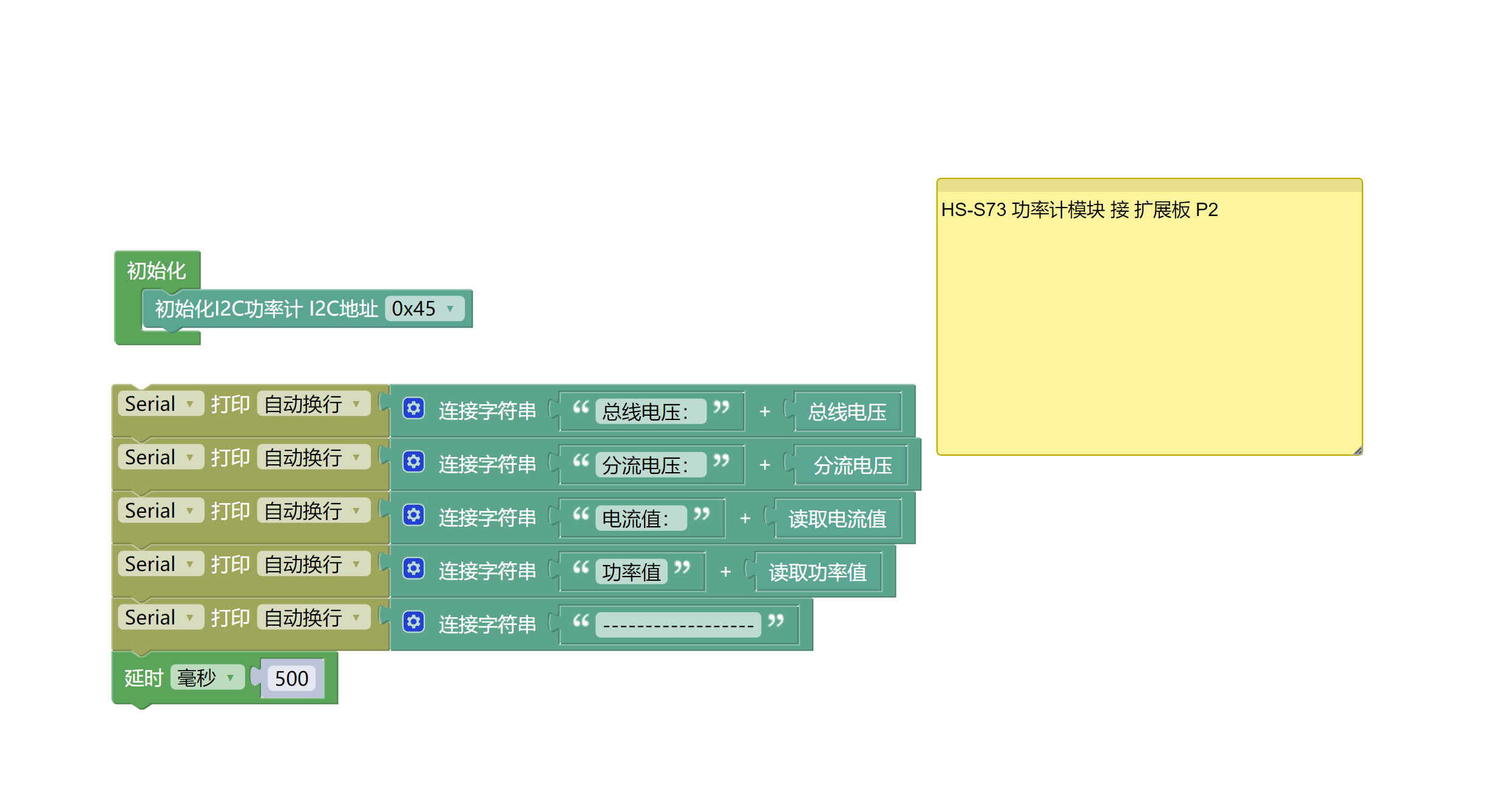
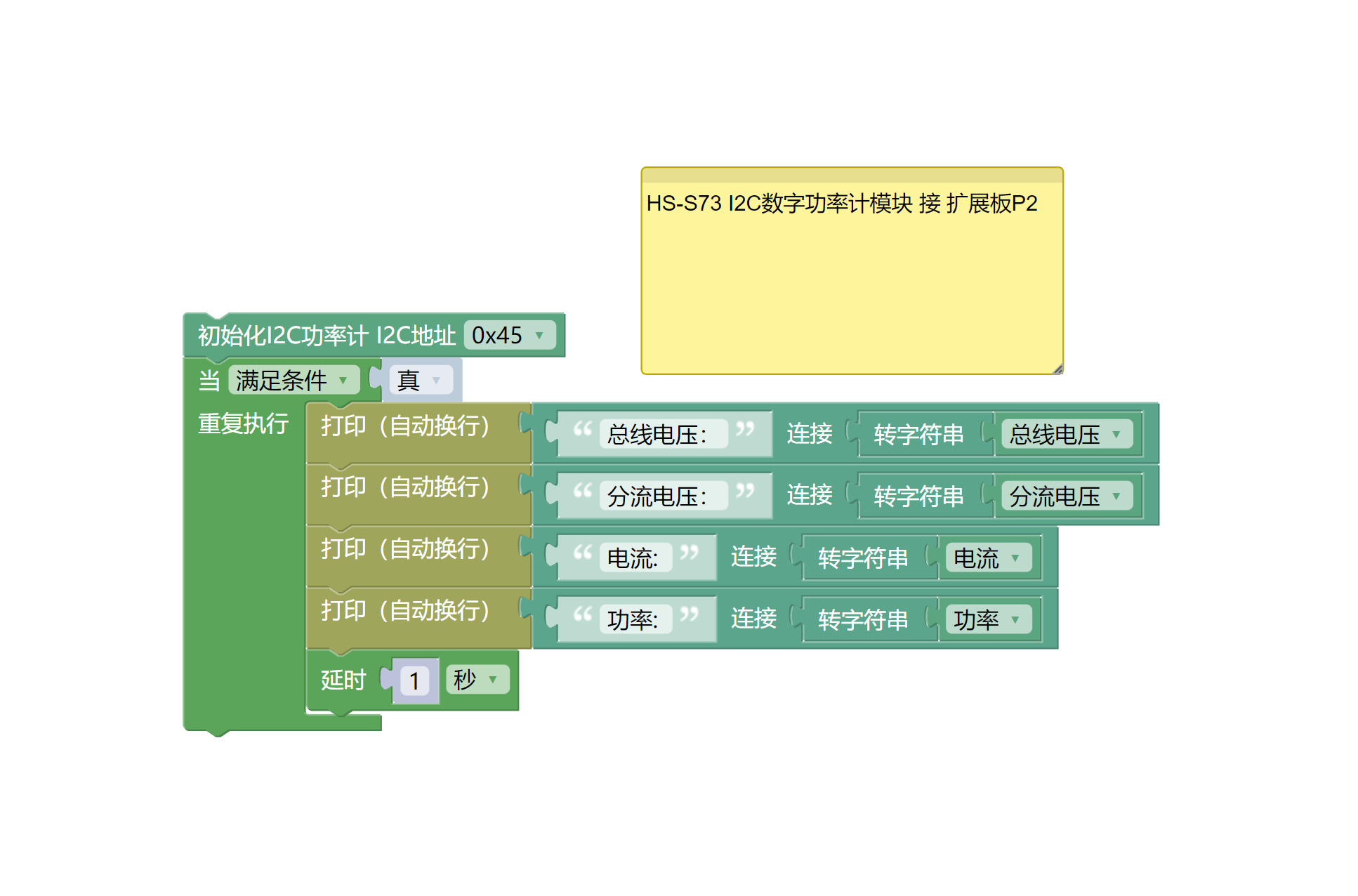
8、미스키 Mixly 예제 프로그램(그래픽 언어)
예제 프로그램(UNO 개발판):다운로드 클릭
예제 프로그램(ESP32 개발 보드):다운로드 클릭
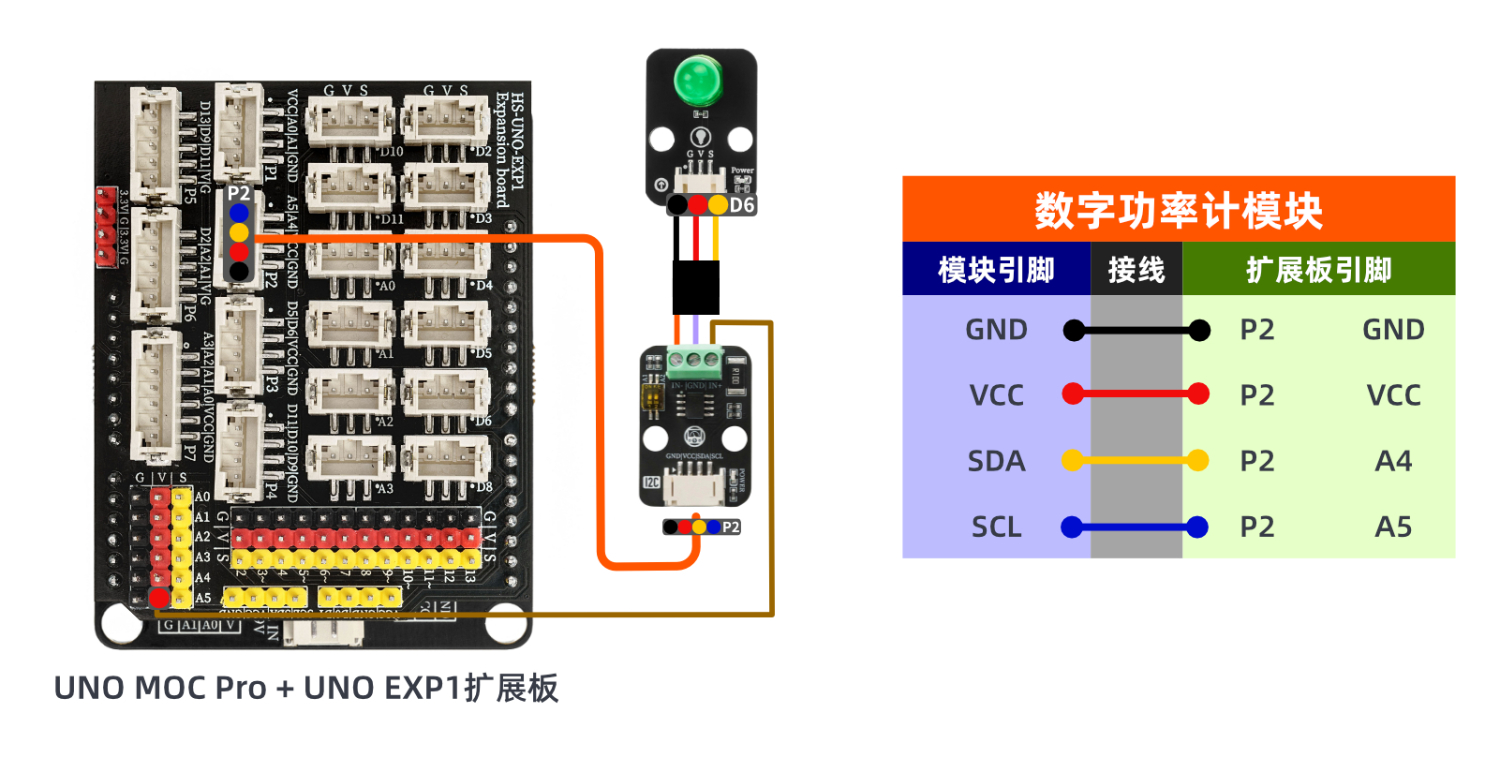
9、테스트 환경 구축
Arduino UNO 테스트 환경 구축
부품 준비:“
UNO-R3 개발 보드 *1
UNO-R3 EXP 확장판 *1
USB type-c 데이터 케이블 *1
HS-S73-L I2C디지털 파워미터 모듈 *1
LED 랜턴 모듈 *1
PH2.0 4P둘쪽 머리 끝 케이블 *1
전기 연결도):
ESP32 Python 테스트 환경 구축
10、비디오 강의
Arduino UNO 비디오 강의:시각화 클릭
ESP32 Python 비디오 강의:
11、테스트 결과
Arduino UNO 테스트 결과:
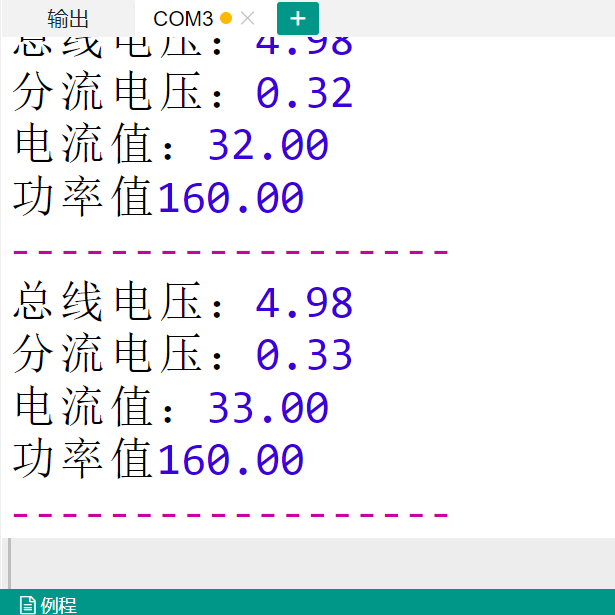
总线전압, 분류전압, 전류치, 전력치를 보여주는 시리얼 포트를 발견했습니다.